Anagram Solver - Crosswords1.27
Publisher Description


Super fast search of over 400,000 words, people, places and phrases.
FEATURES
. Crossword Solver & Thesaurus
. Multi-word anagrams
. Blank letters for board games
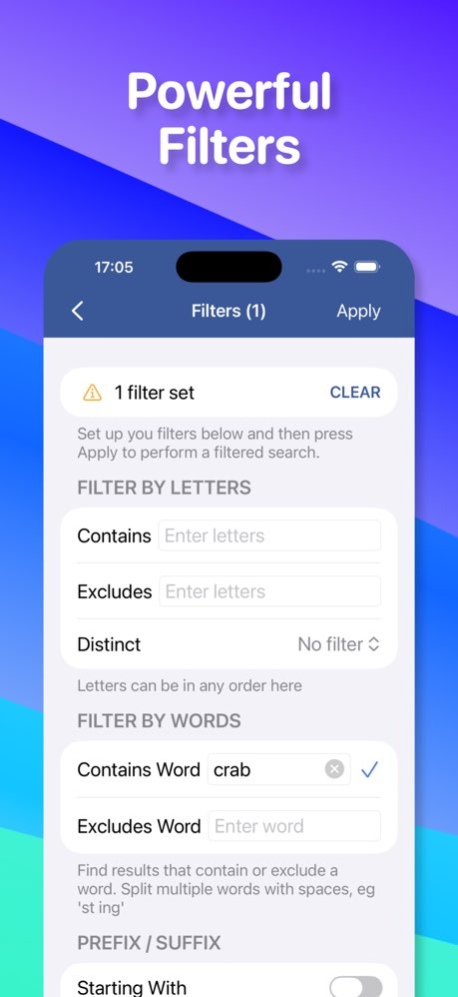
. Powerful filters to refine your results
. Built-in dictionary, look up over 100,000 definitions
ANAGRAMS
Try moonstarer to find astronomer, also finds smaller words such as resonator and tearooms.
CR.SSW.RDS
Use . (or ?) to represent an unknown letter, try c....w... to find clockwork and crossword
CROSSWORD PHRASES
Search over 100K built-in phrases, try m.... ... ...... to find motte and bailey, miles per gallon and milky way galaxy
WORDLE
Green letters use the crossword search, eg ..e.t
Grey letters, add them to the Excludes Letters filter
Yellow letters, add them to the Contains Letters filter
SPELLING BEE
Spelling Bee puzzles are where you only use the letters provided but as many times as you like. Try $qntuaei to find: quinquina, aquanaut and queenie
BLANK LETTERS
Use + to represent blank letters, enter scrabb++ to find crabbers and scrabble.
DEFINITIONS
Press the info icon next to a word to view its definition, example usages and synonyms. You can click on the synonyms for further info and hear the word by pressing the speak button.
Note, if no definition is found the app will search the web for a definition.
THESAURUS
Enter a word to look up related words, ideal for solving crossword clues
CODEWORDS & CRYPTOGRAMS
Try ?1221? to find bottom and hippie. Use the filters to exclude letters you already have found.
WORD LISTS
Español, Français, Português, Deutsch and Italiano word lists can be selected in the app's settings. Try out the Game Acceptable word list that only returns common words suitable for most games.
Version History *Symbol bar now fits the screen for older OS versions
*Fixed a rare crash when entering History/Examples
*Fixed the behaviour of the cursor in the main query field 1.27 Oct 2 • Thesaurus results now appear after the anagram results. Thanks to everyone who sent in feedback.
• Symbol Bar - symbols are now inserted at the cursor position 1.26 Sep 21 *New Thesaurus search, enter a word and find related words - ideal for solving crossword clues.
*The symbol bar now appears above the keyboard and is dismissed with the keyboard
*Bug Fix: search settings are now applied correctly when the app starts 1.25 Sep 11 • Fixed the crossword search, three dots ... were being converted into an ellipsis
• Fixed a crash when double tapping the back button
• A new setting to automatically clear the filters when you start a new search 1.24 May 20 • Filters and the search query are now saved, so you can switch between apps and not lose any data.
• Easier to share results and copy words to the paste board
• New Game Acceptable word list that only contains common words and is suitable for most games
• Symbol Bar that is displayed above the keyboard for accessing common symbols. You need to enable this in the settings.
• Updated the word lists and added more definitions. Thanks to everyone who has sent me words and phrases to include in the list. 1.23 May 15 Updated the word list and dictionary definitions, many thanks to everyone who sent in new words. 1.22 05/01/2025 Removed the gap at the bottom of the results screen. 1.21 04/09/2025 - Updated the word lists, thanks to everyone who sent in new words.
- New search history feature
- The wildcard @ now represents 0 or more letters in crossword queries. 1.20 02/26/2025 New! Built-in Dictionary, look up word definitions within the app. 1.19 04/25/2024 *The app is funded by showing a small banner ad on the results screen. For GDPR compliance the app will pop up a form to allow you to manage your privacy settings.
*Updated the word lists 1.18 01/01/2024 *New filters, NOT Starts With and NOT Ends With, there are now toggle switches on the prefix/suffix filters to enable NOT.
*Improved accessibility features, text within the app will now resize accordingly with the system Text Size setting.
*New setting, you can now choose large or small results font. 1.17 10/03/2023 *Updated the word lists and added the names of another 1000 famous people.
*Bug fixes: Speak option now works again 1.16 11/02/2022 *New settings to allow you to customise the app's appearance and keyboard behaviour
*You can now use ! to represent an unknown vowel in crossword searches.
*Added new words and phrases
*Spelling Bee results now highlight the middle letter 1.15 04/01/2022 - Updates for iOS 15. 1.14 10/12/2021 *Added 100,000 well known phrases
*Monospaced font is now disabled by default, please see settings.
*New Spelling Bee search 1.12 09/22/2021 Listening to feedback, the old style of card tips are back but now improved with a more info option for detailed help. You can change back to the list view via the settings.
New Essential word list of only 90k words, ideal for most crosswords and puzzles where you only use common words.
Settings can now be quickly accessed from the main screen, press the gear icon top left.
Dark mode has been tweaked to make it easier on the eye. 1.11 08/22/2021 Improved privacy controls 1.10 07/20/2021 * Results are now grouped by word size
* Improved help system
* Darker dark mode and new yellow highlight option
* Updated the main word list and added Italian and Portuguese lists. 1.09.00 02/11/2021 New word lists: Spanish, French and German - Go to the settings to try them out.
New speak option on the pop-up menu so you can now hear the word spoken.
Bug fix: Auto-fill suggestions have now been removed from the keyboard. 1.08.02 10/28/2020 *You can now edit the main search query from the filters screen, very useful if you need to apply the same filters to different search queries.
*Updated the main word list
*Squashed several bugs to keep the app in tip top condition 1.07.00 03/07/2020 New word lists
* Main word list is now over 310,000 words
* TWL for US Scrabble® Players
* SOWPODS for World Scrabble® Players
New Filters
* Distinct: only allow words where all the letters are different, useful for codewords.
* Pattern: filter by known and unknown letters
* Reg Exp: regular expression for the expert user
Other new features
* New dictionary look up options
* Three word anagram finder
* Dark mode support
* About and Privacy, review how your data is used
Lots of bug fixes to improve stability. 1.06.00 12/18/2019 Settings now available for all users
* Select standard (130,000 words) or large (280,000) word lists
* Set the results limit up to a maximum of 5000 results
* Option to enable or disable sub-anagram searches for anagram and blank searches
* New definition source, Word Game Dictionary
Filters
* New filters: contains / excludes word
* Letter filters can now correctly handle multiple letters that are the same
* Bug fix - keyboard no longer obscures the text fields when it opens
Miscellaneous
* Over 30% performance improvements for most searches
* For iPhone X users, the tips and definitions screen now go all the way to the bottom of the screen
* Maximum allowed search query length increased to 42 characters
* Added Copy All option to the results pop up menu
Pro Users
* New filters - crossword pattern and regular expression
* Codeword searches, try ..112332 to find cassette and pallette
* Three word anagrams now supported 1.05.01 09/21/2018 Restored the query text field font back to the system default, however you can change the font of the query and the results to a monospaced font in the settings menu.
Fixed graphical glitch with the tips shadows not displaying correctly when the screen is rotated.
Removed banner ads from the filter and definition screens, a small banner is now only displayed on the results screen.
Fixed a crash if you type this in the search "- "
Fixed a bug that meant searches with more than 30 letters produced no results 1.04.00 11/21/2017 Filters - streamline your results by setting filters for word size, prefix/suffix matches, contains letters or excludes letters
Two word anagrams searches now show all word size variations.
Query text field now uses a larger monospaced font to make it easier to enter queries.
The main screen showing the help tips has been redesigned, a lot of users were unaware that you could flick through the tips. 1.03.00 11/16/2017 New Features:-
Blank letters, use + to represent any letter
Prefix @ Suffix searches
Supergrams, find bigger words containing your letters
Color highlighting to show blank and supergram letters
Long press on a result to choose from a range of options to look up the definition
Show Me button on the tips, so you can quickly try a search feature
Sub-anagrams now drill down to 1 letter
New Settings screen
-Choose the web site for definition look ups
-Automatically show the keyboard
New Pro Features:-
Settings, chose the standard (130,000 words) or pro (280,000 words) word list
Settings, set the results limit, up to 5000 results can be shown
Bug fix, interstitial ads were showing, this is now fixed. 1.02.00 01/24/2017
About Anagram Solver - Crosswords
The company that develops Anagram Solver - Crosswords is Mark Bailey. The latest version released by its developer is 1.27. This app was rated by 2 users of our site and has an average rating of 3.5.
To install Anagram Solver - Crosswords on your iOS device, just click the green Continue To App button above to start the installation process. The app is listed on our website since 2026-10-14 and was downloaded 112 times. We have already checked if the download link is safe, however for your own protection we recommend that you scan the downloaded app with your antivirus. Your antivirus may detect the Anagram Solver - Crosswords as malware if the download link is broken.
How to install Anagram Solver - Crosswords on your iOS device:
- Click on the Continue To App button on our website. This will redirect you to the App Store.
- Once the Anagram Solver - Crosswords is shown in the iTunes listing of your iOS device, you can start its download and installation. Tap on the GET button to the right of the app to start downloading it.
- If you are not logged-in the iOS appstore app, you'll be prompted for your your Apple ID and/or password.
- After Anagram Solver - Crosswords is downloaded, you'll see an INSTALL button to the right. Tap on it to start the actual installation of the iOS app.
- Once installation is finished you can tap on the OPEN button to start it. Its icon will also be added to your device home screen.
Program Details
System requirements
Download information
Pricing
Version History
version 1.27
posted on 2026-10-14
Version History *Symbol bar now fits the screen for older OS versions
*Fixed a rare crash when entering History/Examples
*Fixed the behaviour of the cursor in the main query field 1.27 Oct 2 • Thesaurus results now appear after the anagram results. Thanks to everyone who sent in feedback.
• Symbol Bar - symbols are now inserted at the cursor position 1.26 Sep 21 *New Thesaurus search, enter a word and find related words - ideal for solving crossword clues.
*The symbol bar now appears above the keyboard and is dismissed with the keyboard
*Bug Fix: search settings are now applied correctly when the app starts 1.25 Sep 11 • Fixed the crossword search, three dots ... were being converted into an ellipsis
• Fixed a crash when double tapping the back button
• A new setting to automatically clear the filters when you start a new search 1.24 May 20 • Filters and the search query are now saved, so you can switch between apps and not lose any data.
• Easier to share results and copy words to the paste board
• New Game Acceptable word list that only contains common words and is suitable for most games
• Symbol Bar that is displayed above the keyboard for accessing common symbols. You need to enable this in the settings.
• Updated the word lists and added more definitions. Thanks to everyone who has sent me words and phrases to include in the list. 1.23 May 15 Updated the word list and dictionary definitions, many thanks to everyone who sent in new words. 1.22 05/01/2025 Removed the gap at the bottom of the results screen. 1.21 04/09/2025 - Updated the word lists, thanks to everyone who sent in new words.
- New search history feature
- The wildcard @ now represents 0 or more letters in crossword queries. 1.20 02/26/2025 New! Built-in Dictionary, look up word definitions within the app. 1.19 04/25/2024 *The app is funded by showing a small banner ad on the results screen. For GDPR compliance the app will pop up a form to allow you to manage your privacy settings.
*Updated the word lists 1.18 01/01/2024 *New filters, NOT Starts With and NOT Ends With, there are now toggle switches on the prefix/suffix filters to enable NOT.
*Improved accessibility features, text within the app will now resize accordingly with the system Text Size setting.
*New setting, you can now choose large or small results font. 1.17 10/03/2023 *Updated the word lists and added the names of another 1000 famous people.
*Bug fixes: Speak option now works again 1.16 11/02/2022 *New settings to allow you to customise the app's appearance and keyboard behaviour
*You can now use ! to represent an unknown vowel in crossword searches.
*Added new words and phrases
*Spelling Bee results now highlight the middle letter 1.15 04/01/2022 - Updates for iOS 15. 1.14 10/12/2021 *Added 100,000 well known phrases
*Monospaced font is now disabled by default, please see settings.
*New Spelling Bee search 1.12 09/22/2021 Listening to feedback, the old style of card tips are back but now improved with a more info option for detailed help. You can change back to the list view via the settings.
New Essential word list of only 90k words, ideal for most crosswords and puzzles where you only use common words.
Settings can now be quickly accessed from the main screen, press the gear icon top left.
Dark mode has been tweaked to make it easier on the eye. 1.11 08/22/2021 Improved privacy controls 1.10 07/20/2021 * Results are now grouped by word size
* Improved help system
* Darker dark mode and new yellow highlight option
* Updated the main word list and added Italian and Portuguese lists. 1.09.00 02/11/2021 New word lists: Spanish, French and German - Go to the settings to try them out.
New speak option on the pop-up menu so you can now hear the word spoken.
Bug fix: Auto-fill suggestions have now been removed from the keyboard. 1.08.02 10/28/2020 *You can now edit the main search query from the filters screen, very useful if you need to apply the same filters to different search queries.
*Updated the main word list
*Squashed several bugs to keep the app in tip top condition 1.07.00 03/07/2020 New word lists
* Main word list is now over 310,000 words
* TWL for US Scrabble® Players
* SOWPODS for World Scrabble® Players
New Filters
* Distinct: only allow words where all the letters are different, useful for codewords.
* Pattern: filter by known and unknown letters
* Reg Exp: regular expression for the expert user
Other new features
* New dictionary look up options
* Three word anagram finder
* Dark mode support
* About and Privacy, review how your data is used
Lots of bug fixes to improve stability. 1.06.00 12/18/2019 Settings now available for all users
* Select standard (130,000 words) or large (280,000) word lists
* Set the results limit up to a maximum of 5000 results
* Option to enable or disable sub-anagram searches for anagram and blank searches
* New definition source, Word Game Dictionary
Filters
* New filters: contains / excludes word
* Letter filters can now correctly handle multiple letters that are the same
* Bug fix - keyboard no longer obscures the text fields when it opens
Miscellaneous
* Over 30% performance improvements for most searches
* For iPhone X users, the tips and definitions screen now go all the way to the bottom of the screen
* Maximum allowed search query length increased to 42 characters
* Added Copy All option to the results pop up menu
Pro Users
* New filters - crossword pattern and regular expression
* Codeword searches, try ..112332 to find cassette and pallette
* Three word anagrams now supported 1.05.01 09/21/2018 Restored the query text field font back to the system default, however you can change the font of the query and the results to a monospaced font in the settings menu.
Fixed graphical glitch with the tips shadows not displaying correctly when the screen is rotated.
Removed banner ads from the filter and definition screens, a small banner is now only displayed on the results screen.
Fixed a crash if you type this in the search "- "
Fixed a bug that meant searches with more than 30 letters produced no results 1.04.00 11/21/2017 Filters - streamline your results by setting filters for word size, prefix/suffix matches, contains letters or excludes letters
Two word anagrams searches now show all word size variations.
Query text field now uses a larger monospaced font to make it easier to enter queries.
The main screen showing the help tips has been redesigned, a lot of users were unaware that you could flick through the tips. 1.03.00 11/16/2017 New Features:-
Blank letters, use + to represent any letter
Prefix @ Suffix searches
Supergrams, find bigger words containing your letters
Color highlighting to show blank and supergram letters
Long press on a result to choose from a range of options to look up the definition
Show Me button on the tips, so you can quickly try a search feature
Sub-anagrams now drill down to 1 letter
New Settings screen
-Choose the web site for definition look ups
-Automatically show the keyboard
New Pro Features:-
Settings, chose the standard (130,000 words) or pro (280,000 words) word list
Settings, set the results limit, up to 5000 results can be shown
Bug fix, interstitial ads were showing, this is now fixed. 1.02.00 01/24/2017
version 1.27
posted on 2026-10-06
Version History *Symbol bar now fits the screen for older OS versions
*Fixed a rare crash when entering History/Examples
*Fixed the behaviour of the cursor in the main query field 1.27 3d ago • Thesaurus results now appear after the anagram results. Thanks to everyone who sent in feedback.
• Symbol Bar - symbols are now inserted at the cursor position 1.26 Sep 21 *New Thesaurus search, enter a word and find related words - ideal for solving crossword clues.
*The symbol bar now appears above the keyboard and is dismissed with the keyboard
*Bug Fix: search settings are now applied correctly when the app starts 1.25 Sep 11 • Fixed the crossword search, three dots ... were being converted into an ellipsis
• Fixed a crash when double tapping the back button
• A new setting to automatically clear the filters when you start a new search 1.24 May 20 • Filters and the search query are now saved, so you can switch between apps and not lose any data.
• Easier to share results and copy words to the paste board
• New Game Acceptable word list that only contains common words and is suitable for most games
• Symbol Bar that is displayed above the keyboard for accessing common symbols. You need to enable this in the settings.
• Updated the word lists and added more definitions. Thanks to everyone who has sent me words and phrases to include in the list. 1.23 May 15 Updated the word list and dictionary definitions, many thanks to everyone who sent in new words. 1.22 05/01/2025 Removed the gap at the bottom of the results screen. 1.21 04/09/2025 - Updated the word lists, thanks to everyone who sent in new words.
- New search history feature
- The wildcard @ now represents 0 or more letters in crossword queries. 1.20 02/26/2025 New! Built-in Dictionary, look up word definitions within the app. 1.19 04/25/2024 *The app is funded by showing a small banner ad on the results screen. For GDPR compliance the app will pop up a form to allow you to manage your privacy settings.
*Updated the word lists 1.18 01/01/2024 *New filters, NOT Starts With and NOT Ends With, there are now toggle switches on the prefix/suffix filters to enable NOT.
*Improved accessibility features, text within the app will now resize accordingly with the system Text Size setting.
*New setting, you can now choose large or small results font. 1.17 10/03/2023 *Updated the word lists and added the names of another 1000 famous people.
*Bug fixes: Speak option now works again 1.16 11/02/2022 *New settings to allow you to customise the app's appearance and keyboard behaviour
*You can now use ! to represent an unknown vowel in crossword searches.
*Added new words and phrases
*Spelling Bee results now highlight the middle letter 1.15 04/01/2022 - Updates for iOS 15. 1.14 10/12/2021 *Added 100,000 well known phrases
*Monospaced font is now disabled by default, please see settings.
*New Spelling Bee search 1.12 09/22/2021 Listening to feedback, the old style of card tips are back but now improved with a more info option for detailed help. You can change back to the list view via the settings.
New Essential word list of only 90k words, ideal for most crosswords and puzzles where you only use common words.
Settings can now be quickly accessed from the main screen, press the gear icon top left.
Dark mode has been tweaked to make it easier on the eye. 1.11 08/22/2021 Improved privacy controls 1.10 07/20/2021 * Results are now grouped by word size
* Improved help system
* Darker dark mode and new yellow highlight option
* Updated the main word list and added Italian and Portuguese lists. 1.09.00 02/11/2021 New word lists: Spanish, French and German - Go to the settings to try them out.
New speak option on the pop-up menu so you can now hear the word spoken.
Bug fix: Auto-fill suggestions have now been removed from the keyboard. 1.08.02 10/28/2020 *You can now edit the main search query from the filters screen, very useful if you need to apply the same filters to different search queries.
*Updated the main word list
*Squashed several bugs to keep the app in tip top condition 1.07.00 03/07/2020 New word lists
* Main word list is now over 310,000 words
* TWL for US Scrabble® Players
* SOWPODS for World Scrabble® Players
New Filters
* Distinct: only allow words where all the letters are different, useful for codewords.
* Pattern: filter by known and unknown letters
* Reg Exp: regular expression for the expert user
Other new features
* New dictionary look up options
* Three word anagram finder
* Dark mode support
* About and Privacy, review how your data is used
Lots of bug fixes to improve stability. 1.06.00 12/18/2019 Settings now available for all users
* Select standard (130,000 words) or large (280,000) word lists
* Set the results limit up to a maximum of 5000 results
* Option to enable or disable sub-anagram searches for anagram and blank searches
* New definition source, Word Game Dictionary
Filters
* New filters: contains / excludes word
* Letter filters can now correctly handle multiple letters that are the same
* Bug fix - keyboard no longer obscures the text fields when it opens
Miscellaneous
* Over 30% performance improvements for most searches
* For iPhone X users, the tips and definitions screen now go all the way to the bottom of the screen
* Maximum allowed search query length increased to 42 characters
* Added Copy All option to the results pop up menu
Pro Users
* New filters - crossword pattern and regular expression
* Codeword searches, try ..112332 to find cassette and pallette
* Three word anagrams now supported 1.05.01 09/21/2018 Restored the query text field font back to the system default, however you can change the font of the query and the results to a monospaced font in the settings menu.
Fixed graphical glitch with the tips shadows not displaying correctly when the screen is rotated.
Removed banner ads from the filter and definition screens, a small banner is now only displayed on the results screen.
Fixed a crash if you type this in the search "- "
Fixed a bug that meant searches with more than 30 letters produced no results 1.04.00 11/21/2017 Filters - streamline your results by setting filters for word size, prefix/suffix matches, contains letters or excludes letters
Two word anagrams searches now show all word size variations.
Query text field now uses a larger monospaced font to make it easier to enter queries.
The main screen showing the help tips has been redesigned, a lot of users were unaware that you could flick through the tips. 1.03.00 11/16/2017 New Features:-
Blank letters, use + to represent any letter
Prefix @ Suffix searches
Supergrams, find bigger words containing your letters
Color highlighting to show blank and supergram letters
Long press on a result to choose from a range of options to look up the definition
Show Me button on the tips, so you can quickly try a search feature
Sub-anagrams now drill down to 1 letter
New Settings screen
-Choose the web site for definition look ups
-Automatically show the keyboard
New Pro Features:-
Settings, chose the standard (130,000 words) or pro (280,000 words) word list
Settings, set the results limit, up to 5000 results can be shown
Bug fix, interstitial ads were showing, this is now fixed. 1.02.00 01/24/2017
version 1.27
posted on 2026-10-03
Version History *Symbol bar now fits the screen for older OS versions
*Fixed a rare crash when entering History/Examples
*Fixed the behaviour of the cursor in the main query field 1.27 6h ago • Thesaurus results now appear after the anagram results. Thanks to everyone who sent in feedback.
• Symbol Bar - symbols are now inserted at the cursor position 1.26 Sep 21 *New Thesaurus search, enter a word and find related words - ideal for solving crossword clues.
*The symbol bar now appears above the keyboard and is dismissed with the keyboard
*Bug Fix: search settings are now applied correctly when the app starts 1.25 Sep 11 • Fixed the crossword search, three dots ... were being converted into an ellipsis
• Fixed a crash when double tapping the back button
• A new setting to automatically clear the filters when you start a new search 1.24 May 20 • Filters and the search query are now saved, so you can switch between apps and not lose any data.
• Easier to share results and copy words to the paste board
• New Game Acceptable word list that only contains common words and is suitable for most games
• Symbol Bar that is displayed above the keyboard for accessing common symbols. You need to enable this in the settings.
• Updated the word lists and added more definitions. Thanks to everyone who has sent me words and phrases to include in the list. 1.23 May 15 Updated the word list and dictionary definitions, many thanks to everyone who sent in new words. 1.22 05/01/2025 Removed the gap at the bottom of the results screen. 1.21 04/09/2025 - Updated the word lists, thanks to everyone who sent in new words.
- New search history feature
- The wildcard @ now represents 0 or more letters in crossword queries. 1.20 02/26/2025 New! Built-in Dictionary, look up word definitions within the app. 1.19 04/25/2024 *The app is funded by showing a small banner ad on the results screen. For GDPR compliance the app will pop up a form to allow you to manage your privacy settings.
*Updated the word lists 1.18 01/01/2024 *New filters, NOT Starts With and NOT Ends With, there are now toggle switches on the prefix/suffix filters to enable NOT.
*Improved accessibility features, text within the app will now resize accordingly with the system Text Size setting.
*New setting, you can now choose large or small results font. 1.17 10/03/2023 *Updated the word lists and added the names of another 1000 famous people.
*Bug fixes: Speak option now works again 1.16 11/02/2022 *New settings to allow you to customise the app's appearance and keyboard behaviour
*You can now use ! to represent an unknown vowel in crossword searches.
*Added new words and phrases
*Spelling Bee results now highlight the middle letter 1.15 04/01/2022 - Updates for iOS 15. 1.14 10/12/2021 *Added 100,000 well known phrases
*Monospaced font is now disabled by default, please see settings.
*New Spelling Bee search 1.12 09/22/2021 Listening to feedback, the old style of card tips are back but now improved with a more info option for detailed help. You can change back to the list view via the settings.
New Essential word list of only 90k words, ideal for most crosswords and puzzles where you only use common words.
Settings can now be quickly accessed from the main screen, press the gear icon top left.
Dark mode has been tweaked to make it easier on the eye. 1.11 08/22/2021 Improved privacy controls 1.10 07/20/2021 * Results are now grouped by word size
* Improved help system
* Darker dark mode and new yellow highlight option
* Updated the main word list and added Italian and Portuguese lists. 1.09.00 02/11/2021 New word lists: Spanish, French and German - Go to the settings to try them out.
New speak option on the pop-up menu so you can now hear the word spoken.
Bug fix: Auto-fill suggestions have now been removed from the keyboard. 1.08.02 10/28/2020 *You can now edit the main search query from the filters screen, very useful if you need to apply the same filters to different search queries.
*Updated the main word list
*Squashed several bugs to keep the app in tip top condition 1.07.00 03/07/2020 New word lists
* Main word list is now over 310,000 words
* TWL for US Scrabble® Players
* SOWPODS for World Scrabble® Players
New Filters
* Distinct: only allow words where all the letters are different, useful for codewords.
* Pattern: filter by known and unknown letters
* Reg Exp: regular expression for the expert user
Other new features
* New dictionary look up options
* Three word anagram finder
* Dark mode support
* About and Privacy, review how your data is used
Lots of bug fixes to improve stability. 1.06.00 12/18/2019 Settings now available for all users
* Select standard (130,000 words) or large (280,000) word lists
* Set the results limit up to a maximum of 5000 results
* Option to enable or disable sub-anagram searches for anagram and blank searches
* New definition source, Word Game Dictionary
Filters
* New filters: contains / excludes word
* Letter filters can now correctly handle multiple letters that are the same
* Bug fix - keyboard no longer obscures the text fields when it opens
Miscellaneous
* Over 30% performance improvements for most searches
* For iPhone X users, the tips and definitions screen now go all the way to the bottom of the screen
* Maximum allowed search query length increased to 42 characters
* Added Copy All option to the results pop up menu
Pro Users
* New filters - crossword pattern and regular expression
* Codeword searches, try ..112332 to find cassette and pallette
* Three word anagrams now supported 1.05.01 09/21/2018 Restored the query text field font back to the system default, however you can change the font of the query and the results to a monospaced font in the settings menu.
Fixed graphical glitch with the tips shadows not displaying correctly when the screen is rotated.
Removed banner ads from the filter and definition screens, a small banner is now only displayed on the results screen.
Fixed a crash if you type this in the search "- "
Fixed a bug that meant searches with more than 30 letters produced no results 1.04.00 11/21/2017 Filters - streamline your results by setting filters for word size, prefix/suffix matches, contains letters or excludes letters
Two word anagrams searches now show all word size variations.
Query text field now uses a larger monospaced font to make it easier to enter queries.
The main screen showing the help tips has been redesigned, a lot of users were unaware that you could flick through the tips. 1.03.00 11/16/2017 New Features:-
Blank letters, use + to represent any letter
Prefix @ Suffix searches
Supergrams, find bigger words containing your letters
Color highlighting to show blank and supergram letters
Long press on a result to choose from a range of options to look up the definition
Show Me button on the tips, so you can quickly try a search feature
Sub-anagrams now drill down to 1 letter
New Settings screen
-Choose the web site for definition look ups
-Automatically show the keyboard
New Pro Features:-
Settings, chose the standard (130,000 words) or pro (280,000 words) word list
Settings, set the results limit, up to 5000 results can be shown
Bug fix, interstitial ads were showing, this is now fixed. 1.02.00 01/24/2017
version 1.26
posted on 2026-09-26
Version History • Thesaurus results now appear after the anagram results. Thanks to everyone who sent in feedback.
• Symbol Bar - symbols are now inserted at the cursor position 1.26 4d ago *New Thesaurus search, enter a word and find related words - ideal for solving crossword clues.
*The symbol bar now appears above the keyboard and is dismissed with the keyboard
*Bug Fix: search settings are now applied correctly when the app starts 1.25 Sep 11 • Fixed the crossword search, three dots ... were being converted into an ellipsis
• Fixed a crash when double tapping the back button
• A new setting to automatically clear the filters when you start a new search 1.24 May 20 • Filters and the search query are now saved, so you can switch between apps and not lose any data.
• Easier to share results and copy words to the paste board
• New Game Acceptable word list that only contains common words and is suitable for most games
• Symbol Bar that is displayed above the keyboard for accessing common symbols. You need to enable this in the settings.
• Updated the word lists and added more definitions. Thanks to everyone who has sent me words and phrases to include in the list. 1.23 May 15 Updated the word list and dictionary definitions, many thanks to everyone who sent in new words. 1.22 05/01/2025 Removed the gap at the bottom of the results screen. 1.21 04/09/2025 - Updated the word lists, thanks to everyone who sent in new words.
- New search history feature
- The wildcard @ now represents 0 or more letters in crossword queries. 1.20 02/26/2025 New! Built-in Dictionary, look up word definitions within the app. 1.19 04/25/2024 *The app is funded by showing a small banner ad on the results screen. For GDPR compliance the app will pop up a form to allow you to manage your privacy settings.
*Updated the word lists 1.18 01/01/2024 *New filters, NOT Starts With and NOT Ends With, there are now toggle switches on the prefix/suffix filters to enable NOT.
*Improved accessibility features, text within the app will now resize accordingly with the system Text Size setting.
*New setting, you can now choose large or small results font. 1.17 10/03/2023 *Updated the word lists and added the names of another 1000 famous people.
*Bug fixes: Speak option now works again 1.16 11/02/2022 *New settings to allow you to customise the app's appearance and keyboard behaviour
*You can now use ! to represent an unknown vowel in crossword searches.
*Added new words and phrases
*Spelling Bee results now highlight the middle letter 1.15 04/01/2022 - Updates for iOS 15. 1.14 10/12/2021 *Added 100,000 well known phrases
*Monospaced font is now disabled by default, please see settings.
*New Spelling Bee search 1.12 09/22/2021 Listening to feedback, the old style of card tips are back but now improved with a more info option for detailed help. You can change back to the list view via the settings.
New Essential word list of only 90k words, ideal for most crosswords and puzzles where you only use common words.
Settings can now be quickly accessed from the main screen, press the gear icon top left.
Dark mode has been tweaked to make it easier on the eye. 1.11 08/22/2021 Improved privacy controls 1.10 07/20/2021 * Results are now grouped by word size
* Improved help system
* Darker dark mode and new yellow highlight option
* Updated the main word list and added Italian and Portuguese lists. 1.09.00 02/11/2021 New word lists: Spanish, French and German - Go to the settings to try them out.
New speak option on the pop-up menu so you can now hear the word spoken.
Bug fix: Auto-fill suggestions have now been removed from the keyboard. 1.08.02 10/28/2020 *You can now edit the main search query from the filters screen, very useful if you need to apply the same filters to different search queries.
*Updated the main word list
*Squashed several bugs to keep the app in tip top condition 1.07.00 03/07/2020 New word lists
* Main word list is now over 310,000 words
* TWL for US Scrabble® Players
* SOWPODS for World Scrabble® Players
New Filters
* Distinct: only allow words where all the letters are different, useful for codewords.
* Pattern: filter by known and unknown letters
* Reg Exp: regular expression for the expert user
Other new features
* New dictionary look up options
* Three word anagram finder
* Dark mode support
* About and Privacy, review how your data is used
Lots of bug fixes to improve stability. 1.06.00 12/18/2019 Settings now available for all users
* Select standard (130,000 words) or large (280,000) word lists
* Set the results limit up to a maximum of 5000 results
* Option to enable or disable sub-anagram searches for anagram and blank searches
* New definition source, Word Game Dictionary
Filters
* New filters: contains / excludes word
* Letter filters can now correctly handle multiple letters that are the same
* Bug fix - keyboard no longer obscures the text fields when it opens
Miscellaneous
* Over 30% performance improvements for most searches
* For iPhone X users, the tips and definitions screen now go all the way to the bottom of the screen
* Maximum allowed search query length increased to 42 characters
* Added Copy All option to the results pop up menu
Pro Users
* New filters - crossword pattern and regular expression
* Codeword searches, try ..112332 to find cassette and pallette
* Three word anagrams now supported 1.05.01 09/21/2018 Restored the query text field font back to the system default, however you can change the font of the query and the results to a monospaced font in the settings menu.
Fixed graphical glitch with the tips shadows not displaying correctly when the screen is rotated.
Removed banner ads from the filter and definition screens, a small banner is now only displayed on the results screen.
Fixed a crash if you type this in the search "- "
Fixed a bug that meant searches with more than 30 letters produced no results 1.04.00 11/21/2017 Filters - streamline your results by setting filters for word size, prefix/suffix matches, contains letters or excludes letters
Two word anagrams searches now show all word size variations.
Query text field now uses a larger monospaced font to make it easier to enter queries.
The main screen showing the help tips has been redesigned, a lot of users were unaware that you could flick through the tips. 1.03.00 11/16/2017 New Features:-
Blank letters, use + to represent any letter
Prefix @ Suffix searches
Supergrams, find bigger words containing your letters
Color highlighting to show blank and supergram letters
Long press on a result to choose from a range of options to look up the definition
Show Me button on the tips, so you can quickly try a search feature
Sub-anagrams now drill down to 1 letter
New Settings screen
-Choose the web site for definition look ups
-Automatically show the keyboard
New Pro Features:-
Settings, chose the standard (130,000 words) or pro (280,000 words) word list
Settings, set the results limit, up to 5000 results can be shown
Bug fix, interstitial ads were showing, this is now fixed. 1.02.00 01/24/2017 Sub anagram searches now go to 2 letters
Go Pro mode with a word list of over 280,000 words 1.01.00 07/17/2016
version 1.25
posted on 2026-09-19
Version History *New Thesaurus search, enter a word and find related words - ideal for solving crossword clues.
*The symbol bar now appears above the keyboard and is dismissed with the keyboard
*Bug Fix: search settings are now applied correctly when the app starts 1.25 Sep 11 • Fixed the crossword search, three dots ... were being converted into an ellipsis
• Fixed a crash when double tapping the back button
• A new setting to automatically clear the filters when you start a new search 1.24 May 20 • Filters and the search query are now saved, so you can switch between apps and not lose any data.
• Easier to share results and copy words to the paste board
• New Game Acceptable word list that only contains common words and is suitable for most games
• Symbol Bar that is displayed above the keyboard for accessing common symbols. You need to enable this in the settings.
• Updated the word lists and added more definitions. Thanks to everyone who has sent me words and phrases to include in the list. 1.23 May 15 Updated the word list and dictionary definitions, many thanks to everyone who sent in new words. 1.22 05/01/2025 Removed the gap at the bottom of the results screen. 1.21 04/09/2025 - Updated the word lists, thanks to everyone who sent in new words.
- New search history feature
- The wildcard @ now represents 0 or more letters in crossword queries. 1.20 02/26/2025 New! Built-in Dictionary, look up word definitions within the app. 1.19 04/25/2024 *The app is funded by showing a small banner ad on the results screen. For GDPR compliance the app will pop up a form to allow you to manage your privacy settings.
*Updated the word lists 1.18 01/01/2024 *New filters, NOT Starts With and NOT Ends With, there are now toggle switches on the prefix/suffix filters to enable NOT.
*Improved accessibility features, text within the app will now resize accordingly with the system Text Size setting.
*New setting, you can now choose large or small results font. 1.17 10/03/2023 *Updated the word lists and added the names of another 1000 famous people.
*Bug fixes: Speak option now works again 1.16 11/02/2022 *New settings to allow you to customise the app's appearance and keyboard behaviour
*You can now use ! to represent an unknown vowel in crossword searches.
*Added new words and phrases
*Spelling Bee results now highlight the middle letter 1.15 04/01/2022 - Updates for iOS 15. 1.14 10/12/2021 *Added 100,000 well known phrases
*Monospaced font is now disabled by default, please see settings.
*New Spelling Bee search 1.12 09/22/2021 Listening to feedback, the old style of card tips are back but now improved with a more info option for detailed help. You can change back to the list view via the settings.
New Essential word list of only 90k words, ideal for most crosswords and puzzles where you only use common words.
Settings can now be quickly accessed from the main screen, press the gear icon top left.
Dark mode has been tweaked to make it easier on the eye. 1.11 08/22/2021 Improved privacy controls 1.10 07/20/2021 * Results are now grouped by word size
* Improved help system
* Darker dark mode and new yellow highlight option
* Updated the main word list and added Italian and Portuguese lists. 1.09.00 02/11/2021 New word lists: Spanish, French and German - Go to the settings to try them out.
New speak option on the pop-up menu so you can now hear the word spoken.
Bug fix: Auto-fill suggestions have now been removed from the keyboard. 1.08.02 10/28/2020 *You can now edit the main search query from the filters screen, very useful if you need to apply the same filters to different search queries.
*Updated the main word list
*Squashed several bugs to keep the app in tip top condition 1.07.00 03/07/2020 New word lists
* Main word list is now over 310,000 words
* TWL for US Scrabble® Players
* SOWPODS for World Scrabble® Players
New Filters
* Distinct: only allow words where all the letters are different, useful for codewords.
* Pattern: filter by known and unknown letters
* Reg Exp: regular expression for the expert user
Other new features
* New dictionary look up options
* Three word anagram finder
* Dark mode support
* About and Privacy, review how your data is used
Lots of bug fixes to improve stability. 1.06.00 12/18/2019 Settings now available for all users
* Select standard (130,000 words) or large (280,000) word lists
* Set the results limit up to a maximum of 5000 results
* Option to enable or disable sub-anagram searches for anagram and blank searches
* New definition source, Word Game Dictionary
Filters
* New filters: contains / excludes word
* Letter filters can now correctly handle multiple letters that are the same
* Bug fix - keyboard no longer obscures the text fields when it opens
Miscellaneous
* Over 30% performance improvements for most searches
* For iPhone X users, the tips and definitions screen now go all the way to the bottom of the screen
* Maximum allowed search query length increased to 42 characters
* Added Copy All option to the results pop up menu
Pro Users
* New filters - crossword pattern and regular expression
* Codeword searches, try ..112332 to find cassette and pallette
* Three word anagrams now supported 1.05.01 09/21/2018 Restored the query text field font back to the system default, however you can change the font of the query and the results to a monospaced font in the settings menu.
Fixed graphical glitch with the tips shadows not displaying correctly when the screen is rotated.
Removed banner ads from the filter and definition screens, a small banner is now only displayed on the results screen.
Fixed a crash if you type this in the search "- "
Fixed a bug that meant searches with more than 30 letters produced no results 1.04.00 11/21/2017 Filters - streamline your results by setting filters for word size, prefix/suffix matches, contains letters or excludes letters
Two word anagrams searches now show all word size variations.
Query text field now uses a larger monospaced font to make it easier to enter queries.
The main screen showing the help tips has been redesigned, a lot of users were unaware that you could flick through the tips. 1.03.00 11/16/2017 New Features:-
Blank letters, use + to represent any letter
Prefix @ Suffix searches
Supergrams, find bigger words containing your letters
Color highlighting to show blank and supergram letters
Long press on a result to choose from a range of options to look up the definition
Show Me button on the tips, so you can quickly try a search feature
Sub-anagrams now drill down to 1 letter
New Settings screen
-Choose the web site for definition look ups
-Automatically show the keyboard
New Pro Features:-
Settings, chose the standard (130,000 words) or pro (280,000 words) word list
Settings, set the results limit, up to 5000 results can be shown
Bug fix, interstitial ads were showing, this is now fixed. 1.02.00 01/24/2017 Sub anagram searches now go to 2 letters
Go Pro mode with a word list of over 280,000 words 1.01.00 07/17/2016 1.00.03 03/17/2015
version 1.25
posted on 2026-09-12
Version History *New Thesaurus search, enter a word and find related words - ideal for solving crossword clues.
*The symbol bar now appears above the keyboard and is dismissed with the keyboard
*Bug Fix: search settings are now applied correctly when the app starts 1.25 9h ago • Fixed the crossword search, three dots ... were being converted into an ellipsis
• Fixed a crash when double tapping the back button
• A new setting to automatically clear the filters when you start a new search 1.24 May 20 • Filters and the search query are now saved, so you can switch between apps and not lose any data.
• Easier to share results and copy words to the paste board
• New Game Acceptable word list that only contains common words and is suitable for most games
• Symbol Bar that is displayed above the keyboard for accessing common symbols. You need to enable this in the settings.
• Updated the word lists and added more definitions. Thanks to everyone who has sent me words and phrases to include in the list. 1.23 May 15 Updated the word list and dictionary definitions, many thanks to everyone who sent in new words. 1.22 05/01/2025 Removed the gap at the bottom of the results screen. 1.21 04/09/2025 - Updated the word lists, thanks to everyone who sent in new words.
- New search history feature
- The wildcard @ now represents 0 or more letters in crossword queries. 1.20 02/26/2025 New! Built-in Dictionary, look up word definitions within the app. 1.19 04/25/2024 *The app is funded by showing a small banner ad on the results screen. For GDPR compliance the app will pop up a form to allow you to manage your privacy settings.
*Updated the word lists 1.18 01/01/2024 *New filters, NOT Starts With and NOT Ends With, there are now toggle switches on the prefix/suffix filters to enable NOT.
*Improved accessibility features, text within the app will now resize accordingly with the system Text Size setting.
*New setting, you can now choose large or small results font. 1.17 10/03/2023 *Updated the word lists and added the names of another 1000 famous people.
*Bug fixes: Speak option now works again 1.16 11/02/2022 *New settings to allow you to customise the app's appearance and keyboard behaviour
*You can now use ! to represent an unknown vowel in crossword searches.
*Added new words and phrases
*Spelling Bee results now highlight the middle letter 1.15 04/01/2022 - Updates for iOS 15. 1.14 10/12/2021 *Added 100,000 well known phrases
*Monospaced font is now disabled by default, please see settings.
*New Spelling Bee search 1.12 09/22/2021 Listening to feedback, the old style of card tips are back but now improved with a more info option for detailed help. You can change back to the list view via the settings.
New Essential word list of only 90k words, ideal for most crosswords and puzzles where you only use common words.
Settings can now be quickly accessed from the main screen, press the gear icon top left.
Dark mode has been tweaked to make it easier on the eye. 1.11 08/22/2021 Improved privacy controls 1.10 07/20/2021 * Results are now grouped by word size
* Improved help system
* Darker dark mode and new yellow highlight option
* Updated the main word list and added Italian and Portuguese lists. 1.09.00 02/11/2021 New word lists: Spanish, French and German - Go to the settings to try them out.
New speak option on the pop-up menu so you can now hear the word spoken.
Bug fix: Auto-fill suggestions have now been removed from the keyboard. 1.08.02 10/28/2020 *You can now edit the main search query from the filters screen, very useful if you need to apply the same filters to different search queries.
*Updated the main word list
*Squashed several bugs to keep the app in tip top condition 1.07.00 03/07/2020 New word lists
* Main word list is now over 310,000 words
* TWL for US Scrabble® Players
* SOWPODS for World Scrabble® Players
New Filters
* Distinct: only allow words where all the letters are different, useful for codewords.
* Pattern: filter by known and unknown letters
* Reg Exp: regular expression for the expert user
Other new features
* New dictionary look up options
* Three word anagram finder
* Dark mode support
* About and Privacy, review how your data is used
Lots of bug fixes to improve stability. 1.06.00 12/18/2019 Settings now available for all users
* Select standard (130,000 words) or large (280,000) word lists
* Set the results limit up to a maximum of 5000 results
* Option to enable or disable sub-anagram searches for anagram and blank searches
* New definition source, Word Game Dictionary
Filters
* New filters: contains / excludes word
* Letter filters can now correctly handle multiple letters that are the same
* Bug fix - keyboard no longer obscures the text fields when it opens
Miscellaneous
* Over 30% performance improvements for most searches
* For iPhone X users, the tips and definitions screen now go all the way to the bottom of the screen
* Maximum allowed search query length increased to 42 characters
* Added Copy All option to the results pop up menu
Pro Users
* New filters - crossword pattern and regular expression
* Codeword searches, try ..112332 to find cassette and pallette
* Three word anagrams now supported 1.05.01 09/21/2018 Restored the query text field font back to the system default, however you can change the font of the query and the results to a monospaced font in the settings menu.
Fixed graphical glitch with the tips shadows not displaying correctly when the screen is rotated.
Removed banner ads from the filter and definition screens, a small banner is now only displayed on the results screen.
Fixed a crash if you type this in the search "- "
Fixed a bug that meant searches with more than 30 letters produced no results 1.04.00 11/21/2017 Filters - streamline your results by setting filters for word size, prefix/suffix matches, contains letters or excludes letters
Two word anagrams searches now show all word size variations.
Query text field now uses a larger monospaced font to make it easier to enter queries.
The main screen showing the help tips has been redesigned, a lot of users were unaware that you could flick through the tips. 1.03.00 11/16/2017 New Features:-
Blank letters, use + to represent any letter
Prefix @ Suffix searches
Supergrams, find bigger words containing your letters
Color highlighting to show blank and supergram letters
Long press on a result to choose from a range of options to look up the definition
Show Me button on the tips, so you can quickly try a search feature
Sub-anagrams now drill down to 1 letter
New Settings screen
-Choose the web site for definition look ups
-Automatically show the keyboard
New Pro Features:-
Settings, chose the standard (130,000 words) or pro (280,000 words) word list
Settings, set the results limit, up to 5000 results can be shown
Bug fix, interstitial ads were showing, this is now fixed. 1.02.00 01/24/2017 Sub anagram searches now go to 2 letters
Go Pro mode with a word list of over 280,000 words 1.01.00 07/17/2016 1.00.03 03/17/2015
version 1.24
posted on 2026-09-05
Version History • Fixed the crossword search, three dots ... were being converted into an ellipsis
• Fixed a crash when double tapping the back button
• A new setting to automatically clear the filters when you start a new search 1.24 May 20 • Filters and the search query are now saved, so you can switch between apps and not lose any data.
• Easier to share results and copy words to the paste board
• New Game Acceptable word list that only contains common words and is suitable for most games
• Symbol Bar that is displayed above the keyboard for accessing common symbols. You need to enable this in the settings.
• Updated the word lists and added more definitions. Thanks to everyone who has sent me words and phrases to include in the list. 1.23 May 15 Updated the word list and dictionary definitions, many thanks to everyone who sent in new words. 1.22 05/01/2025 Removed the gap at the bottom of the results screen. 1.21 04/09/2025 - Updated the word lists, thanks to everyone who sent in new words.
- New search history feature
- The wildcard @ now represents 0 or more letters in crossword queries. 1.20 02/26/2025 New! Built-in Dictionary, look up word definitions within the app. 1.19 04/25/2024 *The app is funded by showing a small banner ad on the results screen. For GDPR compliance the app will pop up a form to allow you to manage your privacy settings.
*Updated the word lists 1.18 01/01/2024 *New filters, NOT Starts With and NOT Ends With, there are now toggle switches on the prefix/suffix filters to enable NOT.
*Improved accessibility features, text within the app will now resize accordingly with the system Text Size setting.
*New setting, you can now choose large or small results font. 1.17 10/03/2023 *Updated the word lists and added the names of another 1000 famous people.
*Bug fixes: Speak option now works again 1.16 11/02/2022 *New settings to allow you to customise the app's appearance and keyboard behaviour
*You can now use ! to represent an unknown vowel in crossword searches.
*Added new words and phrases
*Spelling Bee results now highlight the middle letter 1.15 04/01/2022 - Updates for iOS 15. 1.14 10/12/2021 *Added 100,000 well known phrases
*Monospaced font is now disabled by default, please see settings.
*New Spelling Bee search 1.12 09/22/2021 Listening to feedback, the old style of card tips are back but now improved with a more info option for detailed help. You can change back to the list view via the settings.
New Essential word list of only 90k words, ideal for most crosswords and puzzles where you only use common words.
Settings can now be quickly accessed from the main screen, press the gear icon top left.
Dark mode has been tweaked to make it easier on the eye. 1.11 08/22/2021 Improved privacy controls 1.10 07/20/2021 * Results are now grouped by word size
* Improved help system
* Darker dark mode and new yellow highlight option
* Updated the main word list and added Italian and Portuguese lists. 1.09.00 02/11/2021 New word lists: Spanish, French and German - Go to the settings to try them out.
New speak option on the pop-up menu so you can now hear the word spoken.
Bug fix: Auto-fill suggestions have now been removed from the keyboard. 1.08.02 10/28/2020 *You can now edit the main search query from the filters screen, very useful if you need to apply the same filters to different search queries.
*Updated the main word list
*Squashed several bugs to keep the app in tip top condition 1.07.00 03/07/2020 New word lists
* Main word list is now over 310,000 words
* TWL for US Scrabble® Players
* SOWPODS for World Scrabble® Players
New Filters
* Distinct: only allow words where all the letters are different, useful for codewords.
* Pattern: filter by known and unknown letters
* Reg Exp: regular expression for the expert user
Other new features
* New dictionary look up options
* Three word anagram finder
* Dark mode support
* About and Privacy, review how your data is used
Lots of bug fixes to improve stability. 1.06.00 12/18/2019 Settings now available for all users
* Select standard (130,000 words) or large (280,000) word lists
* Set the results limit up to a maximum of 5000 results
* Option to enable or disable sub-anagram searches for anagram and blank searches
* New definition source, Word Game Dictionary
Filters
* New filters: contains / excludes word
* Letter filters can now correctly handle multiple letters that are the same
* Bug fix - keyboard no longer obscures the text fields when it opens
Miscellaneous
* Over 30% performance improvements for most searches
* For iPhone X users, the tips and definitions screen now go all the way to the bottom of the screen
* Maximum allowed search query length increased to 42 characters
* Added Copy All option to the results pop up menu
Pro Users
* New filters - crossword pattern and regular expression
* Codeword searches, try ..112332 to find cassette and pallette
* Three word anagrams now supported 1.05.01 09/21/2018 Restored the query text field font back to the system default, however you can change the font of the query and the results to a monospaced font in the settings menu.
Fixed graphical glitch with the tips shadows not displaying correctly when the screen is rotated.
Removed banner ads from the filter and definition screens, a small banner is now only displayed on the results screen.
Fixed a crash if you type this in the search "- "
Fixed a bug that meant searches with more than 30 letters produced no results 1.04.00 11/21/2017 Filters - streamline your results by setting filters for word size, prefix/suffix matches, contains letters or excludes letters
Two word anagrams searches now show all word size variations.
Query text field now uses a larger monospaced font to make it easier to enter queries.
The main screen showing the help tips has been redesigned, a lot of users were unaware that you could flick through the tips. 1.03.00 11/16/2017 New Features:-
Blank letters, use + to represent any letter
Prefix @ Suffix searches
Supergrams, find bigger words containing your letters
Color highlighting to show blank and supergram letters
Long press on a result to choose from a range of options to look up the definition
Show Me button on the tips, so you can quickly try a search feature
Sub-anagrams now drill down to 1 letter
New Settings screen
-Choose the web site for definition look ups
-Automatically show the keyboard
New Pro Features:-
Settings, chose the standard (130,000 words) or pro (280,000 words) word list
Settings, set the results limit, up to 5000 results can be shown
Bug fix, interstitial ads were showing, this is now fixed. 1.02.00 01/24/2017 Sub anagram searches now go to 2 letters
Go Pro mode with a word list of over 280,000 words 1.01.00 07/17/2016 1.00.03 03/17/2015
version 1.22
posted on 2026-05-08
Version History Updated the word list and dictionary definitions, many thanks to everyone who sent in new words. 1.22 05/01/2025 Removed the gap at the bottom of the results screen. 1.21 04/09/2025 - Updated the word lists, thanks to everyone who sent in new words.
- New search history feature
- The wildcard @ now represents 0 or more letters in crossword queries. 1.20 02/26/2025 New! Built-in Dictionary, look up word definitions within the app. 1.19 04/25/2024 *The app is funded by showing a small banner ad on the results screen. For GDPR compliance the app will pop up a form to allow you to manage your privacy settings.
*Updated the word lists 1.18 01/01/2024 *New filters, NOT Starts With and NOT Ends With, there are now toggle switches on the prefix/suffix filters to enable NOT.
*Improved accessibility features, text within the app will now resize accordingly with the system Text Size setting.
*New setting, you can now choose large or small results font. 1.17 10/03/2023 *Updated the word lists and added the names of another 1000 famous people.
*Bug fixes: Speak option now works again 1.16 11/02/2022 *New settings to allow you to customise the app's appearance and keyboard behaviour
*You can now use ! to represent an unknown vowel in crossword searches.
*Added new words and phrases
*Spelling Bee results now highlight the middle letter 1.15 04/01/2022 - Updates for iOS 15. 1.14 10/12/2021 *Added 100,000 well known phrases
*Monospaced font is now disabled by default, please see settings.
*New Spelling Bee search 1.12 09/22/2021 Listening to feedback, the old style of card tips are back but now improved with a more info option for detailed help. You can change back to the list view via the settings.
New Essential word list of only 90k words, ideal for most crosswords and puzzles where you only use common words.
Settings can now be quickly accessed from the main screen, press the gear icon top left.
Dark mode has been tweaked to make it easier on the eye. 1.11 08/22/2021 Improved privacy controls 1.10 07/20/2021 * Results are now grouped by word size
* Improved help system
* Darker dark mode and new yellow highlight option
* Updated the main word list and added Italian and Portuguese lists. 1.09.00 02/11/2021 New word lists: Spanish, French and German - Go to the settings to try them out.
New speak option on the pop-up menu so you can now hear the word spoken.
Bug fix: Auto-fill suggestions have now been removed from the keyboard. 1.08.02 10/28/2020 *You can now edit the main search query from the filters screen, very useful if you need to apply the same filters to different search queries.
*Updated the main word list
*Squashed several bugs to keep the app in tip top condition 1.07.00 03/07/2020 New word lists
* Main word list is now over 310,000 words
* TWL for US Scrabble® Players
* SOWPODS for World Scrabble® Players
New Filters
* Distinct: only allow words where all the letters are different, useful for codewords.
* Pattern: filter by known and unknown letters
* Reg Exp: regular expression for the expert user
Other new features
* New dictionary look up options
* Three word anagram finder
* Dark mode support
* About and Privacy, review how your data is used
Lots of bug fixes to improve stability. 1.06.00 12/18/2019 Settings now available for all users
* Select standard (130,000 words) or large (280,000) word lists
* Set the results limit up to a maximum of 5000 results
* Option to enable or disable sub-anagram searches for anagram and blank searches
* New definition source, Word Game Dictionary
Filters
* New filters: contains / excludes word
* Letter filters can now correctly handle multiple letters that are the same
* Bug fix - keyboard no longer obscures the text fields when it opens
Miscellaneous
* Over 30% performance improvements for most searches
* For iPhone X users, the tips and definitions screen now go all the way to the bottom of the screen
* Maximum allowed search query length increased to 42 characters
* Added Copy All option to the results pop up menu
Pro Users
* New filters - crossword pattern and regular expression
* Codeword searches, try ..112332 to find cassette and pallette
* Three word anagrams now supported 1.05.01 09/21/2018 Restored the query text field font back to the system default, however you can change the font of the query and the results to a monospaced font in the settings menu.
Fixed graphical glitch with the tips shadows not displaying correctly when the screen is rotated.
Removed banner ads from the filter and definition screens, a small banner is now only displayed on the results screen.
Fixed a crash if you type this in the search "- "
Fixed a bug that meant searches with more than 30 letters produced no results 1.04.00 11/21/2017 Filters - streamline your results by setting filters for word size, prefix/suffix matches, contains letters or excludes letters
Two word anagrams searches now show all word size variations.
Query text field now uses a larger monospaced font to make it easier to enter queries.
The main screen showing the help tips has been redesigned, a lot of users were unaware that you could flick through the tips. 1.03.00 11/16/2017 New Features:-
Blank letters, use + to represent any letter
Prefix @ Suffix searches
Supergrams, find bigger words containing your letters
Color highlighting to show blank and supergram letters
Long press on a result to choose from a range of options to look up the definition
Show Me button on the tips, so you can quickly try a search feature
Sub-anagrams now drill down to 1 letter
New Settings screen
-Choose the web site for definition look ups
-Automatically show the keyboard
New Pro Features:-
Settings, chose the standard (130,000 words) or pro (280,000 words) word list
Settings, set the results limit, up to 5000 results can be shown
Bug fix, interstitial ads were showing, this is now fixed. 1.02.00 01/24/2017 Sub anagram searches now go to 2 letters
Go Pro mode with a word list of over 280,000 words 1.01.00 07/17/2016 1.00.03 03/17/2015
version 1.22
posted on 2025-05-01
May 1, 2025
Version 1.22
Updated the word list and dictionary definitions, many thanks to everyone who sent in new words.
version 1.22
posted on 2025-05-01
Updated the word list and dictionary definitions, many thanks to everyone who sent in new words.
